

Better finance decisions don’t start with a bigger spreadsheet. The benefits of a cloud-based finance function include bringing financial information together, making reports easier to access and reducing manual work. You can move processes to the cloud gradually, starting with a focused task such as invoice approvals or journal entries.
Before changing how finance operates, consider the practical effects. Cloud tools can support clearer, more timely decisions, but their value depends on how well they fit your processes and on the quality of the information they hold. Weigh costs, IT responsibilities and accounting workflows together.
This article explains how to plan a move to cloud-based finance, what it can change for reporting and day-to-day accounting, and where subscription costs and reduced platform maintenance may help. It also covers the controls and implementation choices that support a measured transition.
Key Takeaways
- Plan a gradual move to cloud finance, beginning with a process where shared access or clearer approvals would make a practical difference.
- Connect financial data with the information your business already uses to support more timely, informed decisions.
- Assess subscription costs alongside the IT maintenance your business may no longer need to manage itself.
- Identify repetitive accounting tasks that could be streamlined, giving your finance team more capacity for analysis and planning.
2. Improved decision-making through data management and visualisation
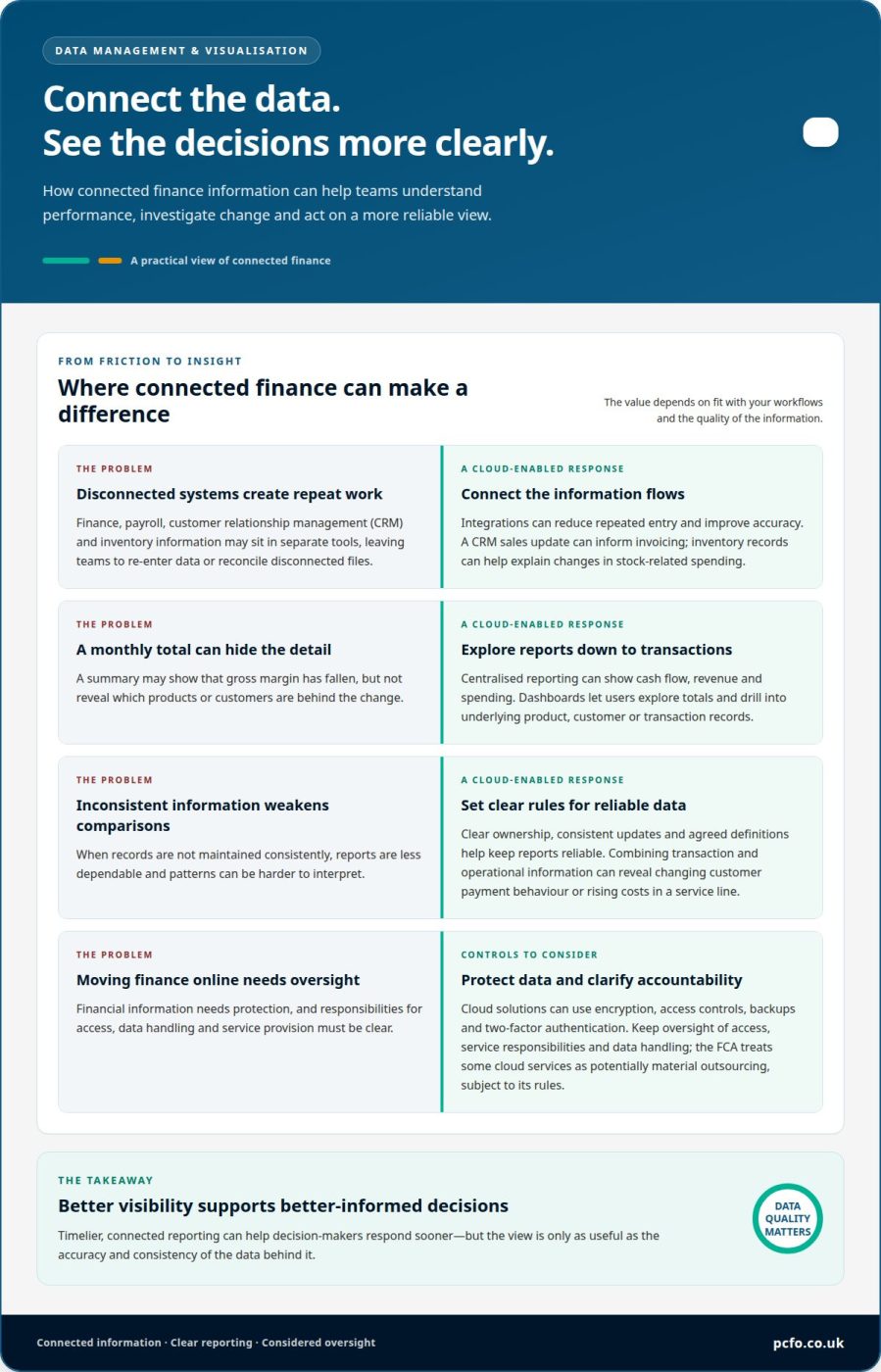
Cloud finance can connect financial data with processes already used across an organisation. For example, integrating finance software with payroll, customer relationship management (CRM) or inventory systems can reduce repeated data entry and improve accuracy. A sales update in the CRM can inform invoicing, while inventory records help explain changes in stock-related spending. This joined-up view gives finance teams more time to interpret results instead of reconciling disconnected files.
Cloud systems can scale as a business adds users, entities, markets or product lines. They can also integrate with other software, including CRM, payroll and inventory tools, so information flows between connected processes. A business might begin with invoice approvals, then connect payroll or inventory as its reporting needs develop. The usefulness of this growth depends on the system’s integrations and the organisation’s workflows.
Centralised information helps teams work from the latest available figures. Cloud-based reporting can show cash flow, revenue and spending, while dashboards let users explore totals and drill into underlying transactions. For example, when reviewing a fall in gross margin, a finance team can examine product or customer records rather than rely only on a monthly summary. Timelier reporting can help decision-makers respond sooner, but decisions still depend on accurate, consistently maintained data.
Data becomes more useful when it is organised for comparison and analysis. Finance teams can combine transaction records with operational information to identify patterns, such as changing customer payment behaviour or rising costs in a particular service line. Clear ownership, consistent updates and agreed definitions help keep reports reliable as the organisation grows.
Security and data residency also matter. Cloud solutions can use encryption, access controls, backups and two-factor authentication to protect financial information. Hosting providers offer services to help businesses address data safety, residency and compliance requirements across jurisdictions. The Financial Conduct Authority treats cloud services used to deliver important business functions as potentially material outsourcing, subject to its rules. Clear oversight of access, service responsibilities and data handling is therefore important when finance processes move online.
3. Subscription-based costs and reduced IT overhead
Cloud finance software is generally supplied as software as a service, or SaaS. Instead of buying and hosting the platform, a business pays a subscription, often based on monthly per-user licences. This can make costs more predictable and let the business align licence numbers with current staffing needs. As teams change, review how many users need access.
Unlike an on-premises finance system, cloud software is hosted online rather than on hardware managed at the business’s premises. This can reduce the need to maintain finance servers and related infrastructure in-house. The SaaS vendor maintains the platform, including software upgrades and patches, while the business remains responsible for its use, access decisions and internal processes.
To understand the overall cost, compare the subscription with the work and infrastructure it may replace. Consider the number of finance users, required software capabilities, existing hardware and staff time spent on maintenance. Include any costs involved in connecting the platform to other systems. This gives decision-makers a clearer picture than considering the subscription alone.
Reduced maintenance can also change the IT workload. Instead of scheduling an internal update for finance software, for example, the vendor maintains the platform and applies upgrades and patches. The IT team can then focus more attention on other technology priorities. The exact workload shift depends on the existing setup and how the cloud system is managed.
Cloud technology can support productivity when it replaces manual tasks or makes reporting easier to access. For instance, finance teams can spend less time maintaining local installations and more time reviewing cash-flow information for operational decisions. A measured transition helps: identify one process, assess its current workload, and compare that with the cloud workflow. For help linking system decisions to business priorities, consider strategic financial oversight.
4. Benefits of cloud accounting software for businesses
Cloud accounting software can bring revenue streams together in one financial record. For a business earning through subscriptions, services and product sales, this consolidated view helps explain total income without collating separate spreadsheets. Teams can use the same accounting information to prepare reports, review performance and plan cash requirements. The benefit is clearer financial context, not simply a change in where the software is hosted.
Automation can reduce repetitive work in accounts receivable and expense administration. A digital reimbursement workflow, for example, can capture a claim, route it for approval and record the outcome. This leaves finance professionals with less manual processing and more capacity for analysis, forecasting and business planning. The key is to remove duplicated effort while keeping responsibilities and approval records clear.
As an organisation grows, cloud financial systems can accommodate additional users, markets and product lines. Some platforms can also support multilingual and multicurrency operations, which may help businesses entering new markets. When a company adds a product line, for example, its finance software needs to show the new revenue and costs in reports. An intuitive interface and straightforward workflows can also help staff adopt the system.
Security and continuity deserve equal attention. Cloud platforms may use encryption, multi-factor authentication, access controls, automated backups and regular software updates. Two-factor authentication adds another sign-in check, while role-based access can limit who sees sensitive accounting records. The Financial Conduct Authority notes that cloud providers may bring cost efficiencies, increased security and more flexible infrastructure capacity. Cloud systems can also include tools to help manage financial reporting and audit requirements, supporting organised records without replacing professional judgement.
4. How do cloud-based finance tools improve automation, efficiency and month-end close times?
Cloud finance tools can shorten the month-end close by organising recurring tasks into defined workflows. A system can route supplier invoices for approval, record their status and notify the next person involved. This gives the finance team a clearer view of outstanding work before reports are prepared. Automated workflows can also reduce duplication and errors caused by manual handling.
A reliable close depends on completing connected tasks in a consistent order. A cloud platform can help teams schedule reconciliations, review entries and track unresolved queries in one shared process. For example, finance staff can spot an unapproved invoice before finalising a reporting period, rather than after figures have circulated. Faster reporting depends on timely inputs and clear ownership, not software alone.
Automation can also create an audit trail for requests and approvals. Each recorded status shows where a task stands and which action remains outstanding. If a journal entry needs review, the team can follow its progress through the approval workflow instead of searching email threads. This record supports accountability and makes exceptions easier to investigate during the close.
Start by mapping the current close process, from transaction capture to report sign-off. Identify repeated data entry, spreadsheet hand-offs and approval delays, then configure a workflow around one bottleneck. Once the team understands the new process, it can refine other close tasks. This staged approach keeps controls visible and helps finance professionals spend less time chasing routine updates and more time explaining results.
For support improving close processes and financial reporting, discuss your month-end reporting needs.
PCFO: Finance Director Services
PCFO’s Finance Director Services can help turn cloud finance information into clearer business decisions. This is a natural next step when reports are available but your business needs stronger financial interpretation, planning or oversight to act on them.
A Finance Director can connect financial reporting with operational priorities, assess how a new system supports your processes and use the resulting information to inform decisions. If growth brings more complex financial requirements, PCFO also provides Chief Financial Officer Services, Business Growth Advisory and Business Planning Consultant support. The right focus depends on the decisions ahead, such as managing expansion or strengthening business plans.
Bring PCFO into the conversation when you want cloud finance to support a broader view of performance, not just faster processing. Contact PCFO to discuss the financial priorities you want to address.
Make your next finance decision count
Choose the business decisions your finance function needs to support next. You might be planning for expansion, assessing a new market or improving confidence in future cash requirements. These priorities give your cloud strategy a clear purpose and keep technology choices connected to the direction of the business.
The benefits of a cloud-based finance function are strongest when reliable financial insight leads to purposeful action. Set a clear direction for how finance information should inform leadership decisions, then review whether your systems and responsibilities support that ambition. The right approach should fit your organisation’s changing needs.
If you’d value experienced financial input on those priorities, contact PCFO to discuss your finance. A focused conversation can help you consider the next steps with greater clarity and confidence.
Frequently Asked Questions
How can you move finance operations to the cloud?
Move finance operations in stages, with a defined business need guiding each change. First, map the processes and records involved, such as purchase approvals or expense claims. Then choose a suitable workflow to migrate, assign responsibility for decisions and train the people using it. A controlled start can reveal process gaps before wider adoption, while keeping existing reporting needs in view.
What are the main benefits of a cloud-based finance function?
The main benefits of a cloud-based finance function are more accessible financial information, adaptable capacity and less reliance on internally maintained software infrastructure. These capabilities are most useful when managers connect financial results to decisions, such as whether to recruit or defer discretionary spending. Software supports the analysis, but clear assumptions and sound financial judgement remain essential.
How can cloud finance systems reduce costs and improve return on investment?
Assess return on investment by comparing the subscription and transition effort with the resources a cloud system may replace. Include implementation work, integrations, staff training, existing software and internal IT time in the assessment. Then identify operational improvements, such as fewer repeated tasks or less locally managed infrastructure. Review those measures after implementation so leadership can see whether the system is delivering value for the organisation.
How can cloud finance provide real-time financial reporting and better decision-making?
Cloud finance can make reports available as transactions are recorded, giving decision-makers a more current view than reports prepared after a period ends. For example, leaders considering a large commitment can review updated cash movements and outstanding liabilities before deciding. Useful reporting depends on prompt transaction entry and consistent categories, so the figures clearly reflect business activity and users can interpret them appropriately.
How does cloud finance support remote and hybrid working?
Cloud finance supports remote and hybrid teams by making shared finance records available to authorised users working in different locations. A manager can review an expense claim while a finance colleague records its accounting treatment, without passing paper files between offices. Documented approval responsibilities and appropriate access permissions help preserve control. Agreed handovers also make routine finance work easier to maintain when colleagues work different schedules.
What steps are involved in moving a finance function to the cloud?
A practical migration starts by defining the outcome, such as faster access to management information. Next, document current processes, select the records and workflows to move, and plan data transfer and user access. Test migrated records against existing balances, resolve discrepancies, then train staff and set a review process. This sequence helps address data quality and responsibilities before the organisation relies on the new system.