

The most capable accounting software isn’t automatically the right fit for a growing business. Choosing the right accounting software for a growing business means finding a system that records income and spending, supports invoicing and reporting, and can adapt as your needs change. The right fit depends on how your business works, not simply on how many features a platform offers.
It’s sensible to want reliable records and a clear view of cash flow without adding unnecessary admin. Your software should make routine tasks manageable now while supporting changes such as more users, higher transaction volumes or new reporting needs. Integrations with tools you already use can also reduce repeated data entry.
This guide explains what accounting software does, how cloud-based and desktop systems differ, and what to assess before choosing an option for a small business. You’ll also learn how to weigh usability, support and training, UK requirements such as Making Tax Digital for VAT where applicable, and the capacity to scale. This gives you a practical basis for comparing options and deciding when additional financial guidance could help.
Key Takeaways
- Choose software around your business’s needs today and the changes you expect as it grows.
- Weigh the flexibility of cloud access against the way your team prefers to work.
- Assess how easy it is to get useful support and training when your team needs it.
- Compare options by their ability to handle UK requirements, integrations and expanding finance needs.
What is accounting software?
Accounting software records income and spending, supports bookkeeping, and turns transactions into reports. Before choosing a system, assess its integrations, UK tax requirements and safeguards for financial data. Check access permissions, encryption, backup arrangements and how data can be restored if files are lost or corrupted.
- Map the work the software needs to handle. List tasks such as recording bank transactions, issuing invoices, reconciling payments and preparing management reports. For example, a growing consultancy may need project costs alongside income, while a retailer may prioritise stock movements.
- Review banking and payment integrations before setup. A bank feed can bring transactions into the bookkeeping system, while payment integrations can help match customer receipts to invoices. Confirm the workflow supports the accounts and payment services your business uses.
- Match integrations to your operating tools. A CRM can pass customer and sales information into accounting records; payroll software can support wage processing; inventory systems can share stock and purchase data. Map what information moves between systems and where staff still need to enter it manually.
- Consider multi-currency support if you deal with overseas clients or suppliers. Check how the software records foreign-currency invoices and payments, and whether reports can show the underlying transaction alongside your chosen reporting currency.
- Include VAT in your requirements. In the UK, a business must register for VAT once its turnover exceeds £90,000 in a 12-month period, according to HM Revenue & Customs. Where VAT applies, choose software that supports digital VAT records and submissions.
- Plan for Making Tax Digital for Income Tax if you are a sole trader or landlord. From 6 April 2026, those with qualifying income over £50,000 must use it, according to HM Revenue & Customs. The threshold falls to £30,000 from April 2027 and £20,000 from April 2028, according to HM Revenue & Customs.
- Record the relevant filing date in your finance calendar. UK sole traders and landlords must submit their Making Tax Digital for Income Tax return by 31 January after the tax year, according to HM Revenue & Customs.
- Set up integrations deliberately. Assign access to the right team members, test a sample transaction from a bank feed through to a report, and confirm that CRM, payroll and inventory records reconcile with the accounting ledger.
Cloud-based versus desktop software
Compare where your financial data is stored, how your team accesses it and what happens during an internet outage. Then assess which approach best supports your reporting and day-to-day finance tasks.
-
Compare cloud and desktop software
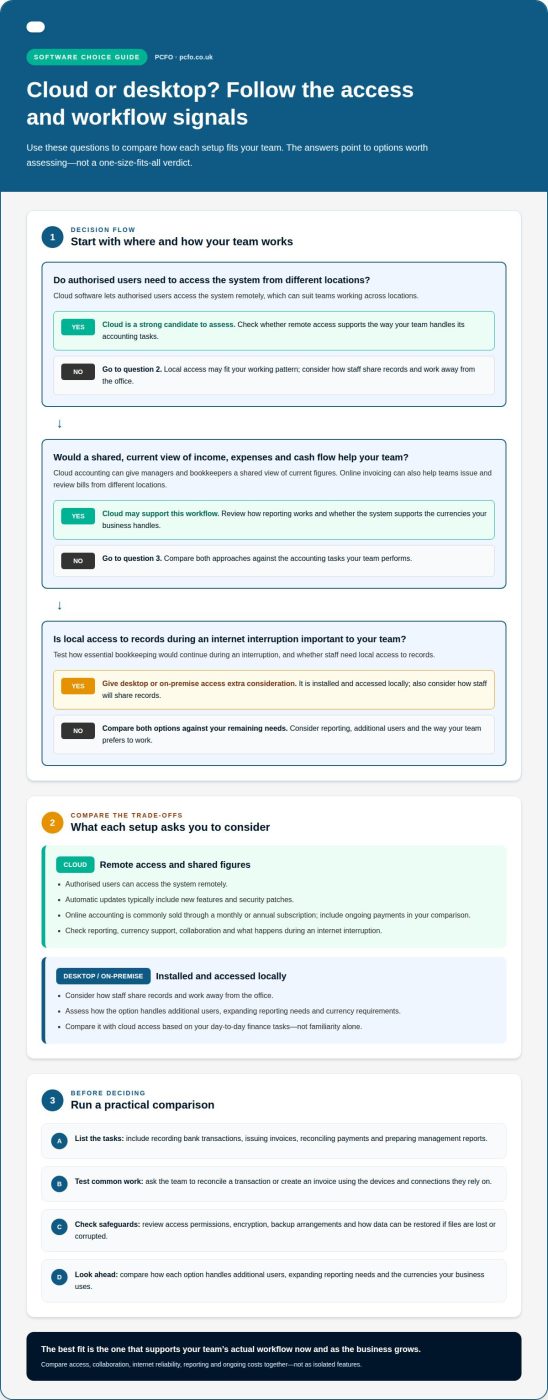
List the accounting tasks your team performs, then compare how each option handles them. Cloud software lets authorised users access the system remotely, which can suit teams working across locations. Desktop or on-premise software is installed and accessed locally, so consider how staff share records and work away from the office. Avoid choosing based on familiarity alone.
-
Review cloud-based financial management
Assess whether live access to income, expenses and cash flow would improve decisions. Cloud accounting can give managers and bookkeepers a shared view of current figures, while online invoicing can help teams issue and review bills from different locations. Check how reporting works and whether the system supports the currencies your business handles.
Cloud systems typically receive automatic updates, including new features and security patches. Online accounting is commonly sold through a monthly or annual subscription. Include those ongoing payments and the practical value of remote access in your comparison.
- Test collaboration and internet reliability. Ask the team to complete common tasks, such as reconciling a transaction or creating an invoice, using the devices and connections they rely on. Consider how essential bookkeeping will continue during an internet interruption and whether staff need local access to records.
- Review access controls before moving financial data. Set permissions according to each person’s role, and check the provider’s backup and recovery arrangements. A cloud system can make shared work easier, but your team still needs clear processes for protecting logins and handling sensitive records.
- Match the system to your next stage of growth. Compare how cloud and desktop options handle additional users, expanding reporting needs and currency requirements. If leadership needs clearer financial oversight, Finance Director Services can support stronger finance planning.
Customer support and training
Plan for implementation as well as daily use. A suitable platform should help your team learn core tasks, manage updates and reduce manual work as the business grows.
- Ask your accountant to assess the software against your bookkeeping process. Share examples such as recording expenses, reconciling bank transactions and preparing management reports. Their recommendation can reflect your current systems and reporting needs, rather than popularity alone. Include the people who handle finance each week, as they can identify practical workflow gaps.
- Map implementation before transferring records. Identify who will configure the chart of accounts, connect bank feeds and import opening balances. Agree how you’ll test sample invoices and expenses before relying on live reports. A clear sequence helps staff understand which records remain manual and which tasks the platform can streamline.
- Check that the training format fits the tasks each user performs. For example, an administrator may need guidance on permissions, while a bookkeeper needs practice reconciling transactions. Review help materials, support channels and guidance for software updates. Feedback from businesses with similar needs can help you assess support quality and reliability.
- Separate software help from professional tax advice. Support teams can explain platform functions, but accounting software doesn’t replace advice on your business’s financial position or tax treatment. Ask your accountant how the system’s reports and records can support decisions, and how they’ll review unusual transactions or changes in your finances.
- Confirm the UK filing workflow before adopting the platform. Making Tax Digital supports businesses in keeping digital records and submitting VAT returns directly through accounting software. Test the process using your VAT records, then clarify which tasks belong to your team and which require accountant input. Good support should make responsibilities clear, not leave staff guessing at filing time.
Accounting software options for small businesses
Choosing the right accounting software for a growing business starts with the work your system needs to handle. Use these steps to compare practical fit and room for growth.
- List the people who need access and the tasks they perform. A sole trader may need straightforward invoicing and bank reconciliation, while a small team may need separate permissions and shared reports. Choose software that suits your current workflow and can accommodate additional users as responsibilities expand.
- Match features to how you earn income. For recurring customer work, assess recurring invoices, automated payment reminders and overdue-payment tracking. A subscription business may benefit from subscription billing, while a project-based firm may need costs grouped by client or job.
- Check whether the system can handle your transactions and cash flow reporting. Look for clear income and expense summaries, creditor and debtor reports, and a straightforward reconciliation process. Test whether a manager can identify overdue invoices and understand available cash without manually exporting data.
- Assess operational features against your business model. A retailer may need inventory management alongside sales records; a business with equipment may need fixed-asset tracking and depreciation reporting. Choose functions that support real workflows and decisions rather than adding complexity without a clear benefit.
- Plan for expansion before selecting a basic package. Check how the software accommodates higher transaction volumes, more users and advanced reporting. If you may operate multiple entities, consider multi-entity capability before your structure changes, even if you currently run one entity.
- Compare the total cost over 3-5 years, including added users, extra features and scaling needs. Arrange a demonstration and use a trial, where available, to test everyday tasks. Ask staff who handle bookkeeping to try invoice creation and reconciliation, then note where the workflow slows.
- A second principle in choosing the right accounting software for a growing business is linking the system to your wider plans. If software choices raise questions about capacity, cash flow or expansion, discuss your business growth plans with an adviser.
PCFO
PCFO helps growing businesses connect accounting decisions with their wider financial plans. If you’re weighing software options alongside changing reporting needs, cash flow pressures or plans to expand, PCFO’s Business Growth Advisor and Business Plan Consultant services can help you assess what your finance function needs to support the next stage.
For businesses that need more senior financial oversight, PCFO’s Outsourced Finance Director consulting and flexible, part-time Chief Financial Officer Services provide strategic guidance alongside day-to-day growth decisions. This can help you choose software that fits how the business operates, rather than treating the platform as a standalone fix.
Contact PCFO to discuss how your accounting systems and financial plans can support your business’s growth.
Make your finance systems ready for what comes next
Choosing the right accounting software for a growing business is not a one-off technology decision. It shapes how clearly you can understand performance and make informed choices as your plans evolve. Treat the software as part of your wider finance approach, with clear ownership for reviewing whether it continues to support the business.
PCFO’s Finance Director and Chief Financial Officer Services, alongside its Business Growth Advisor service, can help connect software decisions with your financial priorities. This perspective is useful when growth plans, reporting needs or operational changes make it harder to assess what your finance function should support next.
Discuss your options and the financial direction you want your systems to support. Contact PCFO to discuss your options, and take your next step with a clearer view of the decisions ahead.
Frequently Asked Questions
What features should growing UK businesses look for in accounting software?
Prioritise features that improve oversight, not just transaction entry. Useful options include clear debtor and creditor reports showing balances over 30, 60 and 90-day periods, plus management reports that separate income and costs by department or project. If you manage equipment, assess fixed-asset records and depreciation reporting. The right combination depends on the decisions your accounts need to support.
Which UK accounting software platforms are best for small and growing businesses?
The best platform is the one that fits your workflows, reporting needs and accountant’s processes. Rather than selecting by name recognition, test common tasks such as correcting a miscategorised expense or producing a project report. Arrange a demonstration and ask about functionality and integrations. Many reputable providers offer 30-day trials, giving your team time to assess how the system works in practice.
How much does UK accounting software cost, including plans and add-ons?
The total depends on the plan, user access and extra functions your business needs, so compare the full cost rather than an introductory offer alone. Model likely software costs over 3-5 years, including added features as the business grows. Separate software costs from any accountant or implementation support fees.
How well does it scale with more users, entities, transactions and locations?
Assess whether the platform can accommodate extra users, entities and transaction volumes without disrupting month-end reporting. For example, a business opening another location may need to compare performance by site, while a group structure may require entity-level records and consolidated oversight. Check how permissions work as responsibilities change, and whether reports remain useful as information volumes increase.
What integrations should accounting software offer for UK banks, ecommerce and payments?
Look for connections that support the full transaction journey. An ecommerce order might create a sales entry, a payment service records the settlement, and the bank feed helps match the deposit. Test how the integration handles refunds, fees and partial payments, as these can complicate reconciliation. Confirm that data reaches the correct accounts and reports without duplicate entries.
How can a business migrate accounting data and onboard staff safely?
Start by securing an export of existing records and agreeing which balances and transaction history must move. Map old account codes to the new chart of accounts, then import a sample and reconcile it against the source system. Restrict access by role, train staff on their actual tasks, and run both systems in parallel until key balances and reports agree.