

Automation works best when it follows the way your business actually handles money, rather than adding another disconnected system. Automating financial processes in a small business starts with mapping finance workflows, identifying repetitive tasks and choosing a manageable process to improve first. Then you can introduce suitable software in stages, with clear approvals and human oversight.
If invoices, payments and reporting still depend on repeated manual handling, it may be time to reduce the friction. The goal is not to automate everything, but to connect the tools and processes that deliver accurate, timely financial information.
This guide explains how accounting automation works, what to consider when choosing integrated finance software, and which technologies can streamline routine tasks. You’ll also learn how to plan a phased transition, support your team and maintain useful controls as your business grows.
Key Takeaways
- Map finance workflows first, then prioritise repetitive tasks such as expense approvals and month-end close.
- Use automation to streamline payroll, supplier invoices and customer payments while keeping exceptions visible for review.
- Choose finance software that connects with your existing systems and can adapt as your business grows.
- Build in clear controls and human oversight so automated processes remain manageable and reliable.
1. How to automate Financial processes?
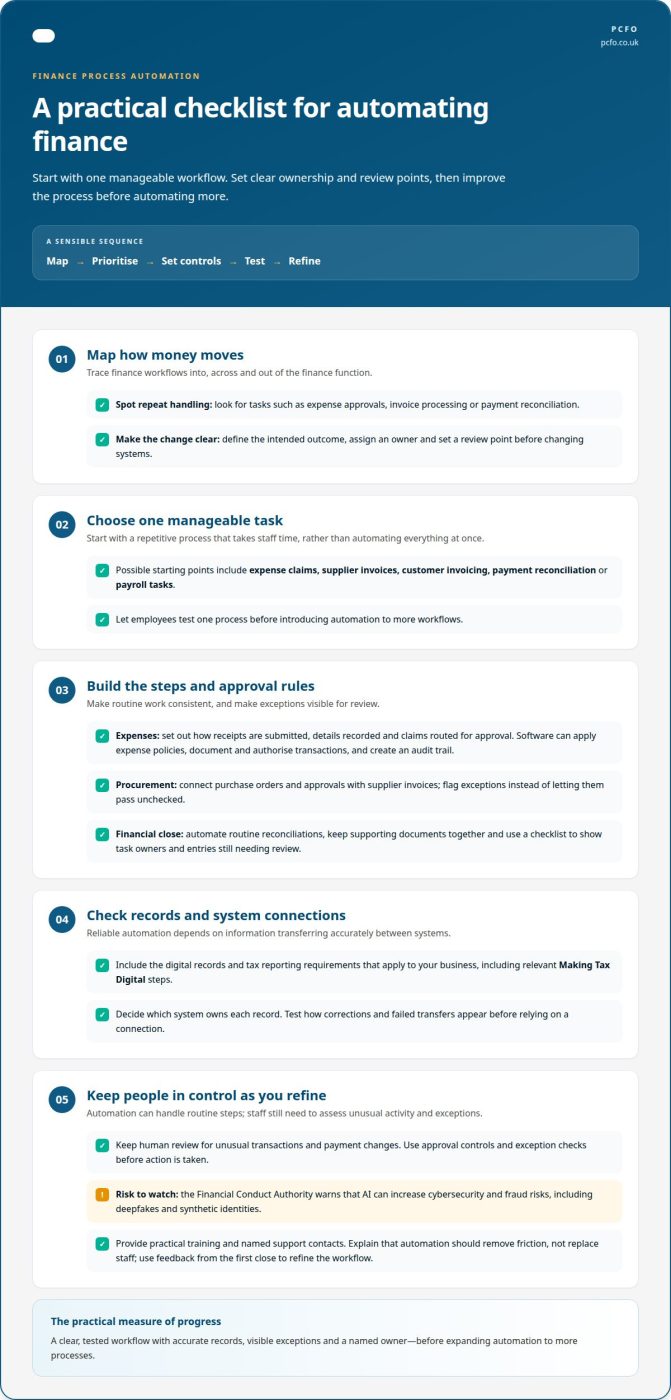
Start by mapping finance workflows into, across and out of the finance function. Prioritise a repetitive task that takes staff time, such as expense approvals, invoice processing or payment reconciliation. Define the intended outcome, assign an owner and set a review point before changing systems. A phased approach lets employees test one manageable process before you automate more.
HMRC’s Making Tax Digital rules cover digital records and tax reporting, so automation should support the requirements that apply to your business. Include relevant records and reporting steps in the workflow, and make sure information transfers accurately between systems.
For expense management, set out a clear process for submitting receipts, recording details and routing claims for approval. Accounting software can apply expense policies, document and authorise transactions, and create an audit trail. Procurement can follow a similar sequence: connect purchase orders and approvals with supplier invoices, then flag exceptions for review instead of letting them pass unchecked.
For financial close, automate routine reconciliations and keep supporting documents in one place. A close checklist can assign tasks to an owner and show which entries still need review. Start with a recurring activity, then use feedback from the first close to refine the workflow and remove duplicated manual steps.
Small businesses can start by automating expense claims, supplier invoices, customer invoicing, payment reconciliation or payroll tasks. For payroll, define how employee changes are collected, inputs reviewed and approved payments recorded. Accounts receivable automation can centralise customer information, giving staff the relevant records when handling disputes and collections.
Manage employee adoption with practical training, named support contacts and a clear explanation: automation should remove friction, not replace staff. Keep human review for unusual transactions and payment changes. The Financial Conduct Authority warns that AI can increase cybersecurity and fraud risks, including deepfakes and synthetic identities. Strong approval controls and exception checks help staff spot suspicious activity before acting.
2. What is Accounting Automation?
Accounting automation uses software to capture financial information, apply rules and move work through defined steps. Rather than re-keying every document, a system can extract fields, match records and route exceptions for review. The aim is to streamline routine actions while giving staff clearer, more timely information.
In accounts payable, an invoice can be scanned, matched to a purchase order, coded and sent for approval. A rules-based workflow can approve invoices within an agreed range and flag unusual amounts for a person to assess. AI and machine learning can help extract document details, but review remains important when data is incomplete or a transaction falls outside policy.
Accounts receivable automation can capture customer orders, validate key details and pass them to accounting software. When payments arrive, the system can extract remittance information, match it to open invoices and update the ledger. This creates a clearer record for follow-up when a payment is short or disputed.
Payroll workflows can bring together approved employee changes, hours and pay inputs, then prepare records and payment information for review. Specialised solutions like Nómina360 illustrate how modern payroll and human resources platforms centralise employee data while keeping essential approval checkpoints intact. Connecting these steps reduces repeated data entry, while a designated person oversees exceptions before payment is released.
Integration determines whether these processes work together. Accounting software can exchange information with enterprise resource planning (ERP) systems that manage wider operations, or customer relationship management (CRM) platforms that hold customer records. Application programming interfaces connect systems, while synchronisation tools keep information aligned. Before automating, define which system owns each record to prevent conflicting updates.
Automation changes the focus of accounting roles, but not the need for judgement. When software handles routine capture and matching, employees can spend more time investigating variances, reviewing cash flow and explaining results. Productivity depends on accurate source data and well-designed approval rules, not automation alone.
For growing businesses, structured financial oversight can help align software workflows with reporting and decision-making needs.
3. Selecting scalable, integrated finance software
Choose a platform to fit your finance workflow, not an impressive feature list. Map the tasks it must support, such as expense approval, invoice processing and management reporting. Identify who needs access in each department and which records must flow between systems. This helps you assess whether one platform meets current needs and can accommodate future growth.
Cloud-based finance software can connect departments through shared information, reducing separate records and manual transfers. Before choosing a platform, check how it handles user permissions, approval steps, reporting and data migration. A growing business may need more users or reporting functions later, so test whether the platform can scale without disrupting core workflows.
Finance automation software varies by function and subscription structure. In the UK, costs depend on the platform, its features, user numbers, integrations and support requirements. Compare the full scope with the processes it will automate, including implementation and ongoing administration, rather than judging a tool by its headline subscription alone.
Integration is central to useful automation. Application programming interfaces (APIs) let systems exchange selected information, while synchronisation tools keep records aligned. For example, an API can pass approved expense data into accounting software and update reporting records. Define which system owns each record, and test how corrections or failed transfers appear before relying on the connection.
Plan onboarding as part of choosing software. Assign an internal owner, map existing records and workflows, and agree how data will be migrated. Ask the software team for practical training materials and a way to resolve technical issues. Test the process using sample invoices and expense claims, then review the output with employees before moving live work onto the platform.
4. Finance process automation technologies
Finance automation combines technologies that capture information, apply rules and move tasks between people or systems. Document recognition, for example, can extract supplier names, invoice dates and totals from uploaded invoices. Workflow software can route each record for coding, approval and payment. The practical value comes from connecting these steps, rather than automating one isolated action. Automating financial processes in a small business works best when the tools address a clear operational need.
Document capture tools can process digital files and scanned paperwork, turning key fields into structured data. Rules-based software can send an invoice to the relevant approver, issue reminders and flag missing information. For payroll, a workflow might collect approved employee changes, prepare records and hold exceptions for review before payment. These technologies reduce repeated entry while preserving defined decision points.
Automated financial controls add safeguards to workflows. Approval processes can route transactions to authorised reviewers, while alerts highlight overdue tasks or unusual entries. Error checks can flag mismatched totals, duplicate invoices or incomplete records. Controls can also account for dependencies, such as preventing payment until the supporting document and approval are recorded.
Dashboards help you monitor whether automation is working as intended. Queue depth can show where invoices are waiting, while exception reports reveal recurring problems, such as missing supplier details. Compare these operational indicators with outcomes such as processing time and savings. Set a review point after implementation, gather employee feedback and adjust rules if unnecessary alerts or hand-offs slow the work.
To implement automating financial processes in a small business, document one workflow, then test its automated version using representative records. Keep a human review point for exceptions, and expand only after the process produces accurate results. For support aligning finance technology with operational priorities, plan your finance automation priorities.
PCFO: Chief Financial Officer Services
PCFO’s Chief Financial Officer Services can help connect finance automation with the decisions your business needs to make. This support is useful when new software, disconnected reporting or growing transaction volumes make it harder to maintain a clear view of performance and cash flow.
Finance Director Services can provide financial direction as you assess workflows and plan improvements. Business Growth Advisory and Business Planning Consultant services can also help align finance processes with wider plans, so technology choices support operational priorities rather than add complexity.
With strategic oversight, you can assess where automation fits, how reporting should inform decisions and which processes need attention first. To discuss your finance priorities, book a free strategy session with PCFO.
Make finance automation support your next stage of growth
A considered approach to automating financial processes in a small business can do more than reduce manual administration. It can give you a stronger foundation for decisions as your priorities, reporting needs and operations change. Start by identifying the financial insight your business needs, then align processes and technology with that goal.
PCFO provides Finance Director Services and Chief Financial Officer Services to support financial leadership, alongside Business Growth Advisory for businesses planning their next stage. This expertise can help connect operational improvements with wider business priorities.
If you’re ready to discuss how finance automation could fit your plans, contact PCFO to discuss finance automation. A clear first step can help you move forward with confidence.
Frequently Asked Questions
How do you automate financial processes?
Choose one recurring task, define where it starts and specify what a completed result looks like. For example, an overdue invoice workflow could create a reminder when its due date passes, then flag the account for staff review if payment remains outstanding. Record who handles exceptions and how they are resolved. This gives you a clear way to assess whether the process works.
What is accounting automation?
Accounting automation uses digital tools to complete or coordinate routine bookkeeping tasks. A transaction might move from a bank feed to a suggested account code, then appear in a reconciliation queue for approval. The person responsible can review uncertain entries instead of entering every detail manually. This keeps transaction records organised while preserving oversight for decisions that need context.
What are the benefits of accounting automation?
Accounting automation can help teams handle routine work consistently and access financial information sooner. For example, a business owner reviewing cash commitments can use up-to-date records to plan supplier payments and follow up on unpaid sales invoices. Clear transaction histories can also make discrepancies easier to investigate. The value depends on accurate source data, suitable controls and workflows that reflect how the business operates.
What is small business automation?
Small business automation uses technology to carry out repeatable tasks across business operations, not just accounting. For example, a new customer record could trigger an internal task to prepare billing details, while a document upload could prompt a review. The aim is to reduce repeated administration and clarify hand-offs. People still set the rules, handle exceptions and make decisions that require judgement.
What accounting and bookkeeping software is best for UK small businesses?
The best fit is software that supports day-to-day bookkeeping and provides records suited to your reporting needs. Consider how it handles bank transactions, sales and purchase records, user access, exports and connections to other business systems. A service business with recurring invoices may prioritise different functions from a retailer managing stock. Test typical tasks using your own workflow before adopting a platform.
How can a small business automate invoicing, payment reminders and accounts receivable?
Set up a consistent sequence: issue an invoice with clear payment details, schedule reminders around its due date, and assign overdue accounts to a person for follow-up. Keep notes of customer replies and disputes alongside each account, so colleagues can see previous actions before contacting the customer. Reconcile incoming payments against open invoices, then investigate unmatched amounts rather than treating them as settled.